
Keep enterprise systems consistent as the data changes.
IOblend synchronises data across CRM, ERP, SaaS, databases, cloud platforms and legacy systems using Change Data Capture, transformation rules, data quality and stateful processing. Propagate changes automatically, resolve conflicting updates, prevent duplicate writes and keep operational records aligned without building another web of point-to-point integration scripts.

Integration moves data. Synchronisation keeps systems consistent.
Data synchronisation is an ongoing form of data integration that maintains agreed consistency between connected systems as records change. The engineering problem is not simply how to copy a value from A to B. It is deciding which changes should propagate, in which direction, which system owns each attribute, and what happens when both sides change.
Move or combine data
Useful when data needs to be collected, transformed or delivered for analytics, migration, reporting or another downstream purpose.
Maintain operational consistency
Useful when several live applications need an agreed version of overlapping business data while users continue updating those systems.
Not every system should be authoritative for every field.
Successful synchronisation begins with a field-level ownership model. A CRM may own sales status, ERP may own credit terms, Service Management may own case state, and a master-data source may own legal entity information. IOblend can encode those survivorship and routing rules into the pipeline.
Detect the change. Decide what it means. Propagate only what should move.
Production synchronisation is a stateful control loop. Every incoming change has to be understood in the context of ownership, mapping, previous state and downstream effects before another operational system is updated.
Detect
Capture the insert, update or delete through CDC, API, event or schedule.
Identify
Resolve the business entity and the record or key affected by the change.
Transform
Convert formats, fields, reference values and system-specific semantics.
Resolve
Apply source-of-truth, conflict, survivorship and precedence rules.
Validate
Check schema, quality, required fields and downstream expectations.
Propagate
Update the systems that should receive the approved change.
Reconcile
Confirm that connected systems now agree on the intended business state.
Two-way updates need rules—or the systems simply argue faster.
Bidirectional synchronisation introduces a harder problem than one-way replication: the update arriving at System B may itself look like a new change that should be sent back to System A. IOblend can use state, keys, metadata and business rules to distinguish legitimate updates from synchronisation echoes.
Attribute precedence
Define which system wins for a field or business condition rather than relying on last-write-wins everywhere.
Origin tracking
Retain enough context to know whether a change originated in the source or was created by the synchronisation process itself.
Concurrent updates
Route or resolve conflicting changes when systems legitimately update the same business data at nearly the same time.
Idempotent writes
Prevent retries or repeated events from producing repeated downstream business actions.
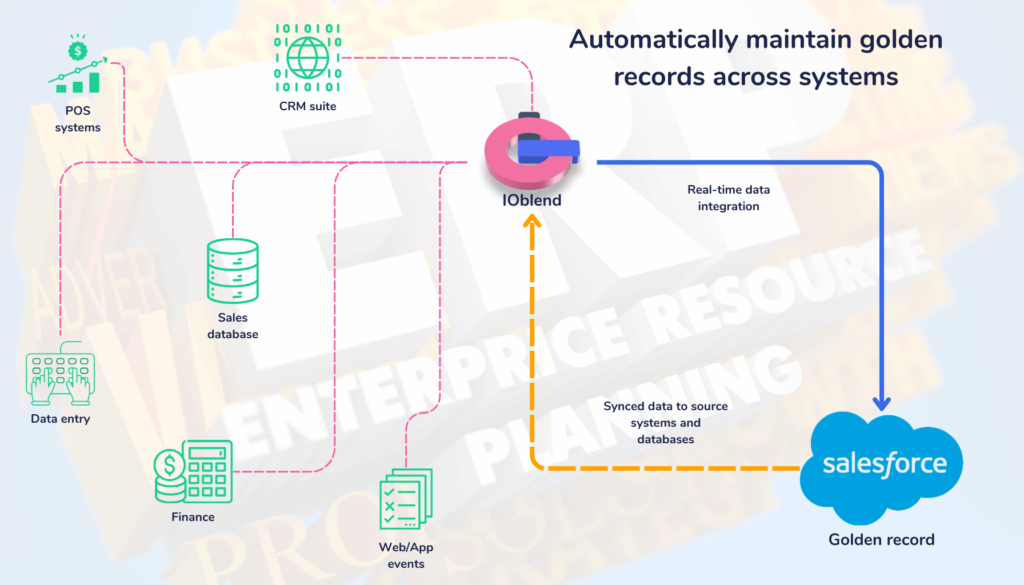
Writing the update is only half the job. Prove the systems agree afterwards.
A production synchronisation flow should validate records before they are written and reconcile the intended state afterwards. That helps catch mapping errors, rejected updates, missed changes and drift before users discover different versions of the business record in different applications.
Modernise the estate without requiring every system to move at the same speed.
System synchronisation allows newer SaaS and cloud applications to coexist with databases, ERP platforms and legacy systems that cannot be replaced immediately. Changes can move between vintages while each platform continues serving its operational users.
Connect commercial applications
Keep CRM, ERP, service and other cloud applications aligned without turning each pair into a bespoke connector project.
Bridge deployment boundaries
Synchronise records across customer-controlled cloud and on-premises environments while transformations occur in the production data layer.
Extend useful system life
Allow modern applications to consume current legacy data while replacement or modernisation proceeds at a business-safe pace.
Synchronisation, Customer 360 and migration solve different problems.
These use cases overlap technically, but the desired business state is different. Making the distinction explicit helps architecture teams avoid turning a synchronisation problem into an unnecessary platform replacement—or a migration into permanent dual maintenance.
Keep live systems aligned
Use when several operational systems must continue to exist and overlapping records need ongoing consistency.
Create a trusted entity view
Use when multiple customer records must be resolved into a governed identity for analytics, CRM, operations or AI.
Move ownership to a new target
Use when the end state is to transfer workloads and eventually retire or reduce dependency on the original platform.
Dynamics 365 + Salesforce + Oracle without three independent integration projects.
A reusable synchronisation layer can apply one set of entity, transformation, ownership and quality rules across several systems rather than burying those decisions separately inside point-to-point connectors.
CDC → map → validate → resolve → propagate → reconcile
Business ownership rules and portable transformation logic remain independent of any single application.
Keep the systems you chose. Put the consistency rules between them.
IOblend is designed to connect heterogeneous enterprise applications and databases rather than make one SaaS vendor the mandatory integration hub. JDBC, APIs, CDC and other supported interfaces can feed the same production synchronisation model.
Questions architects ask before connecting operational systems.
These answers focus on the hard part of enterprise synchronisation: data ownership, bidirectional updates, conflicts, CDC, reconciliation and consistency across cloud, SaaS and legacy applications.
What is enterprise data synchronisation?
Enterprise data synchronisation is the ongoing process of keeping related business records consistent across two or more operational systems. Changes are detected, transformed, validated and propagated according to data-ownership and conflict rules so applications continue to operate from an agreed business state.
How is data synchronisation different from data integration?
Data integration is the broader practice of moving, combining or transforming data. Synchronisation is a specific integration pattern where connected systems must remain consistent over time as users and applications continue changing records.
Can IOblend perform bidirectional data synchronisation?
Yes. IOblend can support bidirectional and multi-system synchronisation patterns using CDC, state, transformation and business rules. The important design work is defining which system owns each attribute and how conflicts or synchronisation echoes should be handled.
How does IOblend prevent synchronisation loops?
IOblend can use keys, state, metadata and pipeline logic to identify the origin of a change and distinguish a legitimate source update from an update created by the synchronisation process itself. This helps prevent A-to-B writes from immediately becoming unintended B-to-A writes.
What happens when two systems update the same record at the same time?
The pipeline can apply explicit conflict-resolution rules based on source authority, business field, timestamp, version, record state or custom SQL/Python logic. Ambiguous conflicts can also be quarantined rather than silently resolved with a generic last-write-wins policy.
How does Change Data Capture help system synchronisation?
CDC identifies inserts, updates and deletes as data changes, allowing IOblend to process only the changed records instead of repeatedly scanning and copying complete datasets. IOblend supports log-based, trigger-based and query-based CDC patterns depending on source-system capabilities.
Can IOblend synchronise CRM, ERP and legacy systems together?
Yes, where the systems expose supported JDBC, API, CDC, file or other connectivity. A single IOblend pipeline family can apply common mapping, quality, ownership and reconciliation rules across modern SaaS platforms, databases and older enterprise systems.
Does synchronisation require one central golden-record database?
No. Some architectures benefit from a central master record, but synchronisation can also use distributed ownership where different systems are authoritative for different domains or fields. IOblend can propagate the trusted values without requiring every enterprise to introduce a new proprietary storage layer.
How is synchronisation quality checked?
IOblend can validate records before downstream writes, isolate exceptions, retain record-level lineage and reconcile connected systems after propagation. This helps identify rejected updates, mapping errors, missing changes and state drift before they become operational inconsistencies.
Can system synchronisation support a cloud migration?
Yes. Synchronisation is often used during parallel migration to keep old and new platforms aligned while the target is tested. The difference is the intended end state: permanent synchronisation keeps both systems operational; a migration eventually moves ownership to the new target.
Does IOblend replace Dynamics 365, Salesforce, SAP or ServiceNow integration tools?
IOblend provides an independent production data integration and DataOps layer that can connect these platforms where the relevant interfaces are available. The applications remain operational systems; IOblend centralises transformation, quality, state and synchronisation logic rather than forcing one application to become the integration hub for all the others.
When is IOblend a strong fit for system synchronisation?
IOblend is a strong fit when several systems must continue operating, overlapping business records change in multiple places, transformations are non-trivial, data quality matters, and the organisation wants reusable synchronisation logic rather than a growing mesh of custom point-to-point integrations.
Bring us the systems, the overlapping records and who is supposed to own what.
We can map the change directions, field ownership, conflict rules, CDC method, transformations and reconciliation checks—then turn them into a production synchronisation design that keeps the applications you already rely on consistent.