
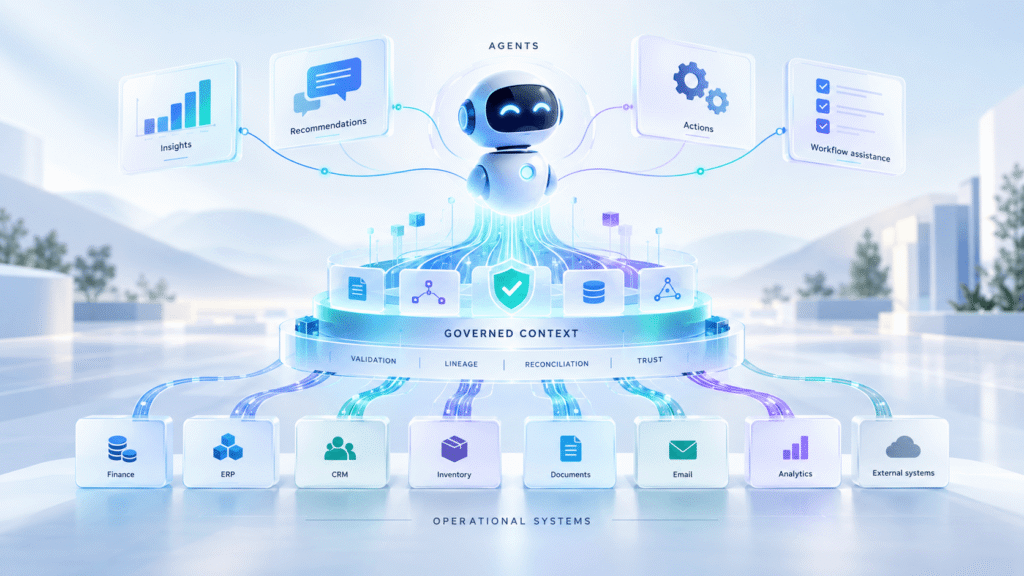
Microsoft Copilot is becoming more than a productivity assistant.
That is the part many businesses are watching closely. The first wave was about helping users write, summarise, search and move a bit faster. Useful, yes. But not transformational on its own.
The more interesting shift is now happening around agents.
Can an agent check an invoice? Can it prepare an order? Can it explain a drop in margin? Can it route an exception? Can it help someone take action rather than simply summarise what has already happened?
For companies already invested in Microsoft, the obvious starting point is the Microsoft stack itself. Dynamics 365, Business Central, Dataverse, Power Platform, Fabric, OneLake, Power BI and Microsoft 365 already cover a large part of the enterprise landscape.
So the question naturally comes up.
Can we do this with Microsoft alone?
In some cases, yes. At least to begin with.
Microsoft has a strong and improving agentic story. Copilot Studio gives teams a way to build agents. Microsoft 365 Copilot sits inside the tools people already use. Dynamics 365 Copilot brings assistance into business applications. Fabric and Power BI support analytics. OneLake gives Fabric a common lake foundation, including support for open lakehouse patterns such as Delta and Iceberg interoperability.
That is a good place to start.
But it is not the whole answer.
The real issue is not whether an agent can be created. It is whether the agent is working from business context that is reliable enough to act on.
That is where the harder work begins.
Microsoft Copilot Agents: Why the Microsoft-Only Route Looks Attractive
The Microsoft-only route is attractive because it feels logical.
Most businesses do not want another platform unless there is a clear reason for it. If users already work in Teams, Outlook, Dynamics and Power BI, it makes sense to keep the agent experience there as well.
There are also good practical reasons. Identity is familiar. Security is familiar. The applications are already part of daily work. The internal politics are often easier. Procurement may be simpler. User adoption is usually better when people do not have to leave the tools they already know.
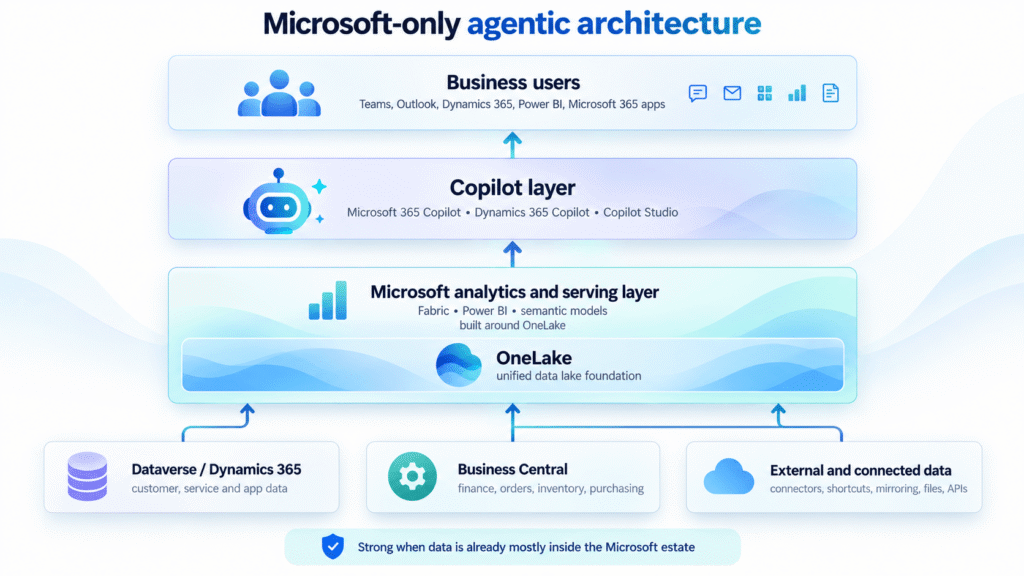
In a Microsoft-only architecture, operational applications, collaboration data, documents, analytical models and connected sources feed Microsoft’s data and analytics surfaces. Fabric and Power BI support the analytical layer, with OneLake acting as the shared lake foundation underneath. Copilot then uses Microsoft-controlled surfaces to assist users inside Teams, Outlook, Dynamics, Power BI and other Microsoft applications.
For early use cases, this can work well.
A sales agent can summarise opportunities and next steps. A service agent can help answer questions from case history and knowledge articles. A finance assistant can help users inspect invoices, balances and month-end status. A document assistant can support intake and review.
These are sensible use cases. They are also the easier ones.
The difficulty starts when agents are expected to help with operational work, not just productivity work.
The Real Copilot Challenge: Operational Context
There is a big difference between asking an agent to summarise a meeting and asking it to help prepare an order.
The second task carries operational risk.
Before an order is created, the business may need to know whether the customer is valid, whether the product code is correct, whether the price is current, whether stock is available, whether the customer has a credit issue, whether the address is allowed, whether the order is a duplicate, and whether there is an unresolved dispute.
That context rarely sits neatly in one place.
This is where many AI programmes start to feel less clean than the demo.
The agent may exist. The connectors may exist. The data may be technically reachable. But the context may still not be good enough.
A customer can appear differently across systems. Product codes can vary by channel. Stock can look available in one view but already be committed somewhere else. An invoice can be readable as a document but still fail against purchase order, receipt, tax or duplicate rules.
The agent is not really the problem here.
The data foundation is.
Why Microsoft-Only AI Programmes Can Become Hard to Scale
The common trap is that the stitching becomes the architecture.
At first, everything looks manageable. A connector here. A Power Automate flow there. A Fabric pipeline for one reporting need. A custom connector for another system. A notebook to clean a difficult dataset. A spreadsheet that holds a mapping table because two systems disagree. A Power BI model that quietly fixes definitions downstream.
None of these choices are wrong in isolation.
The problem is what happens over time.
Each team solves its own problem. Each use case adds a little more glue. Each integration carries its own assumptions. Before long, the business has many useful components, but no clear production data layer.
Someone still has to answer the awkward questions.
Which system owns the customer?
Which product code wins?
Which fields are safe for an agent?
What happens when a write-back fails?
How do we replay exceptions?
How do we prove where an answer came from?
How do we stop an agent from acting on stale or incomplete context?
These questions do not disappear because there is a connector, a lake or a dashboard.
They become more important once agents start helping people act.
Agentic AI Exposes Weak Data Foundations
Traditional reporting hides more than we admit.
A dashboard shows a number. Someone questions it. Someone investigates. A finance analyst checks the source. A data engineer looks at the pipeline. A business user explains a manual adjustment. The process may be slow, but humans are still filling the gaps.
Agents change that dynamic.
An agent is expected to respond quickly. It may combine data from several places. It may recommend an action. It may prepare a transaction. It may trigger a workflow. It may explain something to a user with confidence.
That creates a higher bar for the data underneath.
If the context is fragmented, the answer may be fluent but incomplete. If business rules are hidden in spreadsheets or people’s heads, the agent may miss an important constraint. If exceptions are not clearly managed, the agent may treat unresolved records as normal. If lineage is weak, users may not know why an answer was given.
This is why agentic AI is not only an AI adoption problem.
It is a production data readiness problem.
The winners will not simply be the companies that connect the most systems. They will be the companies that prepare the right operational context before the agent sees it.
From Connected Data to Agent-Ready Data
This is where the conversation changes.
It is no longer just about Microsoft versus non-Microsoft. That framing is too simple.
Microsoft can provide the user interface, applications, agent environment, analytics platform and lake foundation. In many organisations, that is exactly where the user experience should stay.
The missing layer is often the messy operational middle.
That middle layer has to connect to systems, understand change, validate records, reconcile entities, manage state, handle exceptions, preserve lineage and publish trusted outputs.
Some companies will build that manually. For a narrow use case, that may be perfectly reasonable.
But as the number of systems, agents and operational processes grows, this middle layer becomes too important to be accidental.
It becomes the place where business truth is assembled before it is used by analytics, applications or agents.
That is the point where the architecture needs another layer. Not necessarily another user-facing platform. Not another dashboard. Not another place where people have to work.
A proper production data layer.
What a Production Data Layer Should Do
A production data layer is not just a pipe between systems.
It has a different job.
It should connect to operational systems without forcing the business to replace them. It should understand changes as they happen. It should validate data before it is trusted. It should reconcile customers, products, suppliers, transactions and other business entities across systems.
It should preserve current state and history. It should manage exceptions rather than hiding them. It should make lineage visible so users can understand where an answer came from. It should control what is safe to expose to analytics, applications and agents.
It should also support write-back carefully.
That matters. The moment an agent helps create an order, update a record, prepare a journal or route a workflow, the architecture is no longer just analytical. It becomes operational. At that point, loose integration is not enough.
The layer underneath the agent needs to know what has been checked, what has failed, what has been quarantined, what can be replayed, and what should never be sent downstream.
This is the difference between connected data and agent-ready data.
Connected data can be reached.
Agent-ready data can be trusted.
Where IOblend Fits in a Microsoft Copilot Architecture
This is where IOblend fits.
Not as a replacement for Microsoft. Not as another place users have to work. Not as a parallel analytics estate that competes with Fabric, OneLake or Power BI.
IOblend is designed to act as the production data layer beneath the Microsoft experience.
It connects to the systems that matter, validates and reconciles data in motion, manages state and exceptions, preserves lineage, and publishes trusted outputs into the right Microsoft surface.
That might be Fabric. It might be OneLake. It might be Dataverse. It might be Power BI. It might be a safe context layer for an agent. It might be controlled write-back into an operational system.
The aim is simple: keep the user experience where it belongs, but make the operational context behind it more reliable.
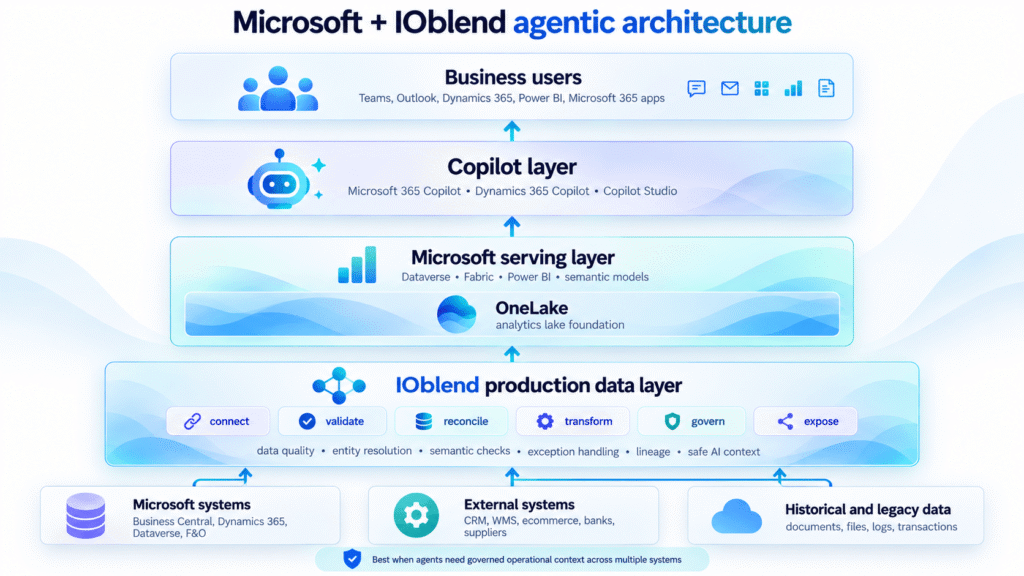
In this architecture, users still work in Microsoft. That is important.
The point is not to replace the Microsoft experience. Copilot Studio knowledge sources can still help ground agents in enterprise content. Power Platform connectors in Copilot Studio can still expose tools and actions to agents. Dataverse Web API can still support application data through an OData-based model. Business Central APIs can still support integration through REST APIs, OData and custom APIs. OneLake can still provide the analytical lake foundation inside Fabric, including Delta and Iceberg interoperability.
That is the right place for much of the user and analytics experience to live.
The question is what happens before data reaches those surfaces.
This is where the production data layer matters. In IOblend terms, that layer should connect to the operational estate, validate the data, reconcile business entities, manage current and historical state, quarantine exceptions, preserve lineage and publish trusted outputs into the right Microsoft surface.
That could mean feeding trusted operational data into Fabric and OneLake. It could mean exposing safer context to Copilot-facing workflows. It could mean synchronising Business Central, Dynamics 365 and external systems without turning every project into a new point-to-point integration. It could also mean creating the kind of AI isolation layer discussed in our article on MCP, AI agents and live enterprise data, where agents receive controlled context rather than direct access to live systems.
This is also why entity resolution becomes so important. If the same customer, supplier or product appears differently across systems, an agent may still produce a confident answer, but from the wrong business context. We covered that problem in more detail in Real-Time Entity Resolution for Enterprise Data and AI.
IOblend is designed for this layer. It is not trying to move users away from Microsoft. It is designed to make the data behind Microsoft analytics, applications and agents more reliable. The wider product architecture is explained in the IOblend product overview, and the architectural role is covered in more detail on IOblend for Data Architects.
This is the practical split.
Microsoft provides the place where users work.
A production data layer prepares the context those users and agents depend on.
IOblend provides that layer out of the box.
